"We quantized this model to NVFP4."
Have you ever paused at a sentence like that? Quantization is one of the core technologies Nota AI works on, so it comes up often on the Nota AI blog. But if someone asked what it actually means, it would be hard to answer right away. Honestly, until now even I just figured, "I guess they cut something out of the model to make it smaller."
I'm Nota AI's mascot, after all, so I decided I should at least understand quantization properly, and this time I studied it carefully. It would be a shame to keep it to myself, so I'll walk you through what I learned, one piece at a time.
Let's start with the textbook definition: quantization is a compression technique that represents the numbers an AI model uses for its calculations with fewer bits, which shrinks both the model size and the amount of computation. Your head's already spinning a little, right? That's okay. I'll unpack it slowly from here, one step at a time.
To understand quantization, it helps to start with why we need it. Let me give you an example. Say we have to find the average weight of 100 third-year boys at Nota Middle School. We have two scales. One reads down to the first decimal place, and the other reads only whole numbers.
With the whole-number scale, each student's weight is a little less accurate. But what happens when we average all 100? Rounding nudges some numbers up a bit and others down a bit, and they mix together, so even if each number is less accurate, the overall result, the average, comes out almost the same. If the only thing we need is the average weight, do we really have to write down every number with its decimals?
AI models are much the same. An AI model is made up of billions to hundreds of billions of numbers, and these numbers are usually stored precisely, down to several decimal places, like 0.027341…. Just as the average weight on the scale came out almost the same, writing each number a little less precisely often doesn't drop the model's performance by much.
Meanwhile, because we write the numbers with fewer bits, in other words more compactly, the whole model gets lighter. A lighter model can run on small devices like smartphones, and on servers it needs fewer GPUs. That is why we need quantization.
So, how about now? Doesn't that definition, which sounded like an alien language at first, look a little different? Read it again, and "Representing numbers with fewer bits to reduce model size and computation" simply means representing numbers a little less precisely to make the model lighter. Just like writing weights as whole numbers instead of with decimals.
With the scales, the number you write down changed depending on whether the markings went to the first decimal place or only to whole numbers. In the same way, making the markings coarser (spacing them farther apart) so values are expressed with fewer distinct steps is the basic principle of quantization.
Let's look a little closer with a ruler measuring length. Say we have an object that is 12.37 cm long. Measured with a ruler marked in fine 0.01 cm steps, you can write it down exactly as 12.37. With a ruler marked in 0.1 cm steps, you write the nearest mark, 12.4, and with a ruler marked in 1 cm steps, you write it as 12.
The coarser the markings, the fewer values you can express. 12.37 turns into a rougher value like 12.4 or 12. In exchange, it drifts a little from the original. 12.4 is off from the original by 0.03, and 12 is off by 0.37. This gap, created by snapping each number to its nearest mark, is the quantization error.
Looking at a single number like this doesn't feel like much, but a model holds billions of numbers with all sorts of values, like 0.0273, 0.0315, and 0.0098. Let's draw markings for these numbers the same way. Since most of the numbers sit between 0 and 0.03, if we draw marks from 0 to 0.03 at 0.01 intervals, we get four marks: 0, 0.01, 0.02, and 0.03.
Now we rewrite each of the 16 original numbers as its nearest mark value. For example, both 0.0273 and 0.0315 become 0.03. The count of numbers stays at 16, but the values a number can take are now limited to the four marks. Since only these rewritten values are kept instead of the original numbers, the 16 scattered values shrink to 4, and the model gets lighter too.
Earlier we reduced the values numbers could take down to 4 marks. In real quantization, the number of bits sets how many distinct values you can express. Computers write numbers with 0s and 1s, and each single digit is called a bit.
You don't have to think too hard about bits. Just remember that every extra bit doubles the number of values you can express. 2 bits gives 4 values, 4 bits gives 16, and 8 bits gives 256. If there are four marks, as in Figure 2, you can write each number with 2 bits.
If you read AI articles, you've probably come across terms like INT8, FP8, and NVFP4. At first, they looked like secret codes to me. These are all names of number formats used in quantization. The number at the end is the bit count, and the front part is how the numbers are represented. INT (integer) spaces its values at a fixed interval, while FP (floating point) changes that spacing depending on the size of the value. In ruler terms, INT is a ruler with evenly spaced marks, and FP is a ruler with fine marks near small values that spread wider as the values grow.
If you look at "Where it's mainly used" in Table 2, each format is used in different places. One reason is the chip. A quantized model only gets faster in practice if the chip and software can compute that format efficiently. For example, most chips support INT8, but FP8 and NVFP4 can be computed quickly only on some hardware, such as the latest GPUs. So when you choose a format, you have to look at the chip the model will run on too.
We said quantization makes a model lighter while keeping as much performance as possible. So how much lighter does it actually get? The key is the bit count we just saw.
The numbers a model settles on during training are called parameters, and weights make up most of them. If you store a model with 7 billion parameters (7B) in FP32, each number takes 4 bytes (32 bits), so just storing the numbers needs about 28 GB. That drops to about 14 GB in FP16, about 7 GB in INT8, and about 3.5 GB in INT4. Every time the bit count halves, the size halves too. A 28 GB model is too much for my laptop, but 3.5 GB sounds worth a try. (When you actually run the model, it needs more memory on top of this to hold intermediate values from the calculations.)
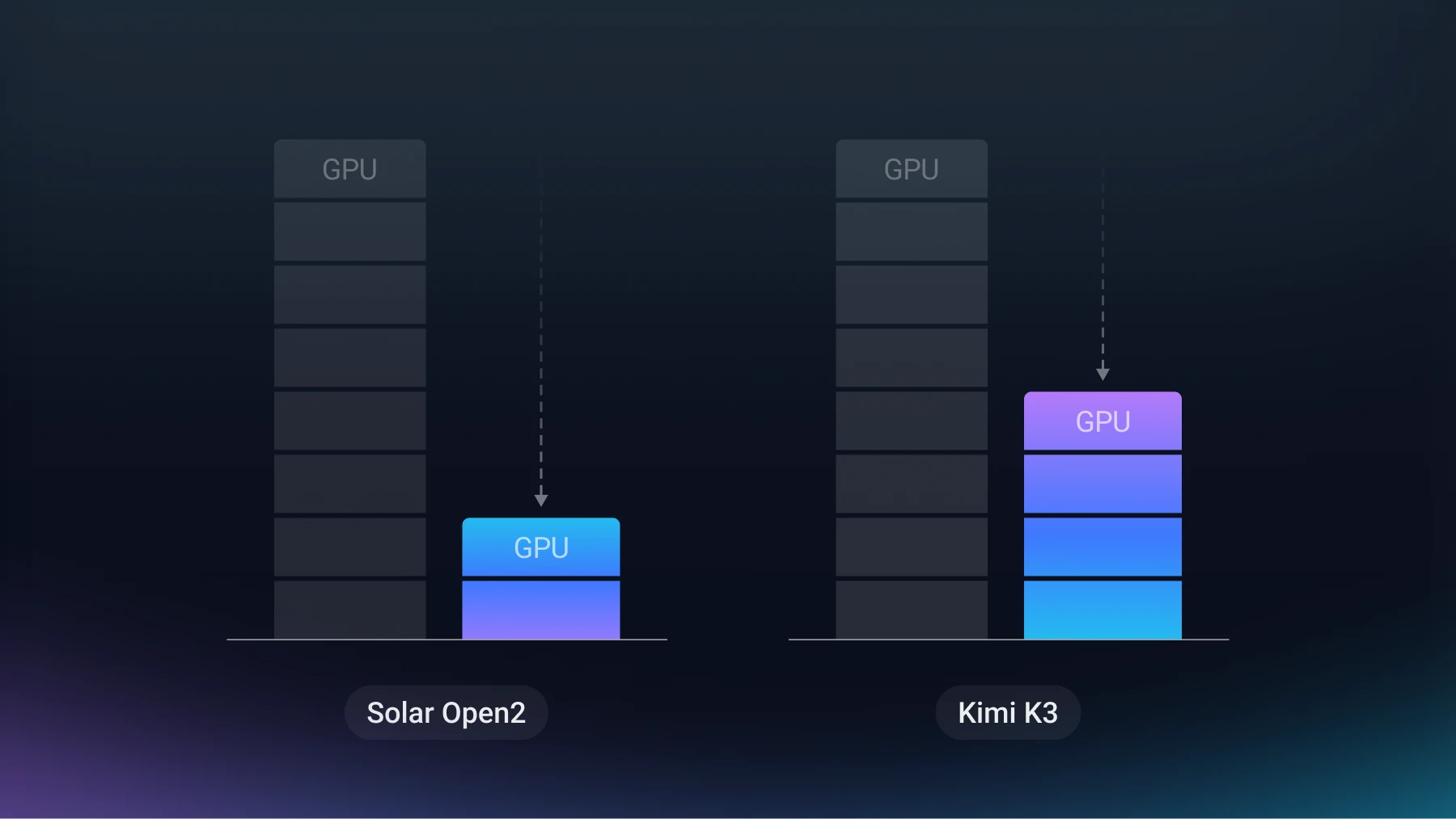
There is a real example too. When Nota AI quantized Upstage's Solar Open2 model (250 billion parameters) to 4 bits, the weights shrank from 500.6 GB to 142.9 GB, so a model that needed 8 H100 GPUs could now run on 4. Above all, quantization reduces memory this way, and on chips that support the format, you can also expect faster computation and lower power draw.
Of course, getting lighter like this isn't free. Just as we said the average weight comes out "almost" the same, a model's answers aren't exactly identical either. The less precisely you represent numbers, the more the model's performance can slip. How much it slips depends on the model and the task, but with a reasonable level of quantization, in many cases the drop isn't large. For the Solar Open2 above, the average score across 15 tests covering agents, math, code, Korean, and more fell only 0.40 points, from 81.57 to 81.17, before and after quantization, and 4 of the 15 actually scored higher.
Up to this point, quantization might look fairly simple, but in practice it isn't that easy. How much performance slips depends heavily on how you set the range of the marks. For example, say one unusually large value (an outlier) is mixed in among the numbers you're quantizing. Because the number of marks is fixed by the bit count, covering that large value means spreading a limited set of marks over a wider range. Then the remaining small numbers get snapped to coarse marks, and their gap from the original values can grow much larger.
In fact, when Nota AI quantized LG AI Research's K-EXAONE (236 billion parameters) to NVFP4, large values like this were concentrated in a few layers. So, while keeping the calculation results the same, Nota AI mixed the numbers so that the size packed into one large value was split across many numbers. With the outliers reduced, the marks could be packed tightly again, and as a result the accuracy stayed on par with the original.
For those of you who've followed along this far, here's one last thing. When quantizing, before writing numbers to the marks, you first have to set the range of the marks. Weights are numbers that are already fixed, so their range is easy to see right away. But the intermediate values that appear anew while the model produces an answer, called activations, change their range with the input, so it's hard to know it precisely ahead of time.
So you feed the model a little sample data and first look at what range the activations fall in and how widely they spread. This process is called calibration. If the data used for calibration is very different from the real usage environment, the range of the marks gets set wrong, and the quantization error can grow accordingly.
The name comes from "quantum," a basic unit that can't be split any further. Quantization means expressing a continuous value as a multiple of that basic unit. In this article's terms, the basic unit is the spacing between marks, and the multiple is which mark a number lands on. When physics says energy is quantized, meaning it can only take discrete values, it's the same idea.
Both are compression techniques that make models lighter. Quantization keeps the count of numbers the same and reduces the bits used to write each number. Pruning removes less important numbers or connections outright, which reduces the count of numbers. Actually, the "cutting out to make it smaller" that I misunderstood at first is closer to pruning. The two methods are often used together. I'll study pruning later and tell you more about it!
NVFP4 is a 4-bit floating-point quantization format NVIDIA built for its latest GPUs (the Blackwell generation). In ruler terms, it splits the numbers into small groups and sets the mark spacing separately for each group. That gives a smaller error than using the same ruler for every number. It computes quickly from this GPU generation onward, and on earlier GPUs there is no speed gain.
W is the bit count for the weights, and A is the bit count for the activations. In the analogy of solving a math problem, weights are the formulas you've memorized in advance, and activations are the intermediate work you jot on scratch paper while solving. Weights usually don't change when producing an answer, so you can quantize them ahead of time, before deployment. Activations are created anew each time you produce an answer and have to be handled on the fly, which makes them trickier. So W4A16 quantizes only the weights to 4 bits and leaves the activations at the 16 bits models commonly use.