Jeff Dean, called "a Google legend" for his deep involvement in everything from the AI-specific TPU chip to Gemini, closed out 27 years at Google in August. For his first talk after stepping down, he chose Korea. There, Dean said the future of AI hinges on how much hardware and compute you can secure, and how efficiently you use it.
In other words, the axis of competition is shifting from model size to compute efficiency.
And the GPUs used for training and inference have become the most expensive resource in AI infrastructure. The H100, the most widely used of them, goes for over $20,000 per unit, and even then supply is hard to come by. So what if you could compress an AI model that once needed eight H100s and run it on just two, without sacrificing accuracy?
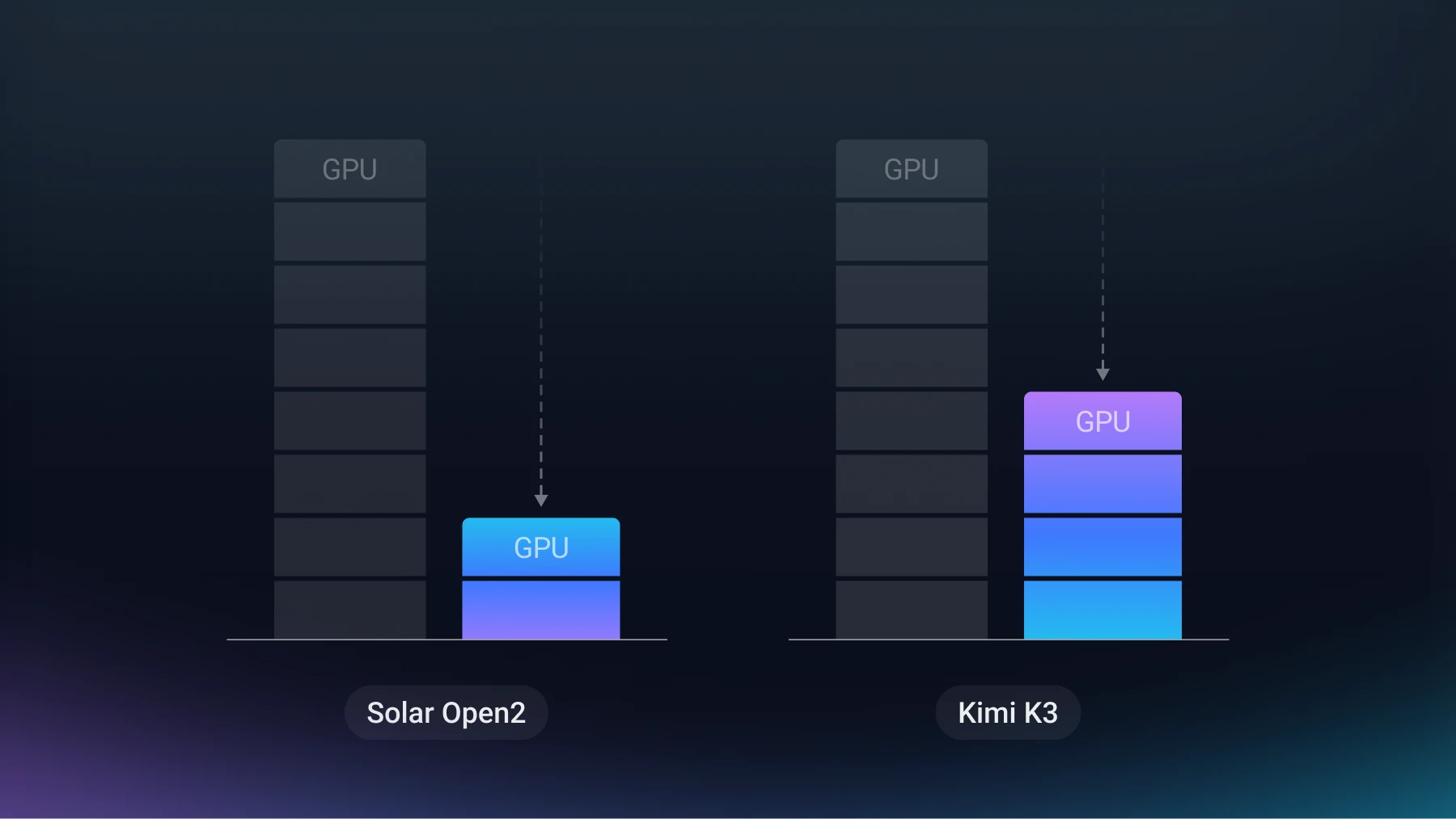
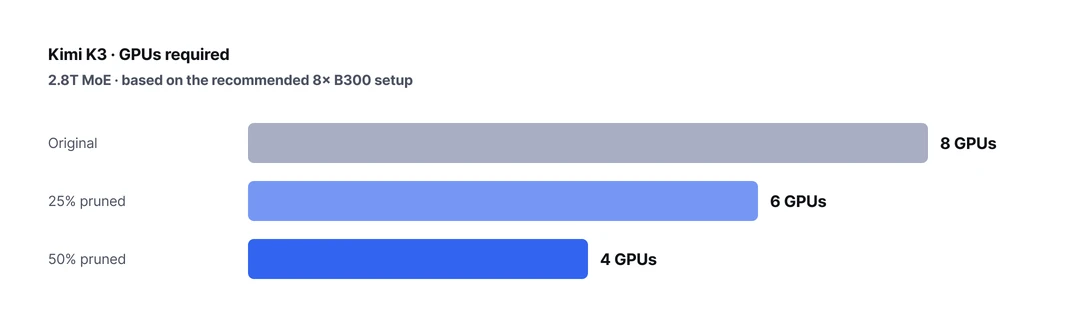
Nota AI answered that question with two frontier-class models. Upstage's Solar Open2 250B went from eight H100s down to two. Moonshot AI's Kimi K3, at 2.8T parameters, likewise runs on four B300s instead of the recommended eight.
To see how compression cuts the card count, start with where GPU memory actually goes. Model weights have a fixed size, so they always take up the same space. The KV cache grows and shrinks with context length and the number of concurrent users. Activations are used only mid-computation and are freed once the calculation finishes.
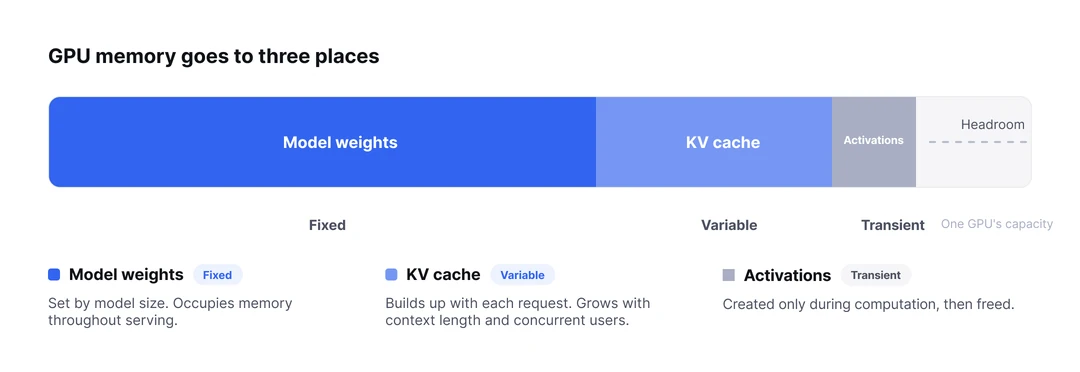
What stays in memory, then, is weights and the KV cache. Of the two, weights take the largest share and are the only fixed quantity, which makes them the starting point for setting the GPU count. Take weight away, and the total capacity you need shrinks by that much, and so does the number of cards you have to buy. This is exactly where model compression ties directly into cost.
Solar Open2 250B is the model Upstage released as the second deliverable of Korea's sovereign AI foundation model initiative. In BF16, its weights come to 500.6 GB. Add 20 GB of KV cache to handle a 256K context at batch 1, and you reach 520.6 GB. That is enough to require eight H100s.
Bringing that number down took two steps.
First we lowered precision. This is the work of converting weights stored at 16 bits each in BF16 down to 4 bits, that is, quantization.
Quantization needs a reference. To move a 16-bit value onto the narrow scale of 4 bits, you have to know what range of values each part of the model actually uses. So you send representative input data through the model and collect statistics, and that input is called calibration data.
But a Mixture-of-Experts (MoE) model picks only some experts for each input, so how often each expert activates varies widely. An expert that is rarely called has too little data, its scale turns out inaccurate, and quantization quality breaks down from there. To address this, we applied two techniques Nota AI developed.
After quantization the weights come to 142.9 GB, a 71% reduction from the original. Even with 20 GB of KV cache added, that is 162.9 GB, which fits on four H100s. The serving setup goes from eight cards to four. This alone is a solid result, and most efforts stop here, but Nota AI went one step further.
Precision can only take you this far. To go lower, you have to touch the structure. This time we removed experts themselves.
Expert pruning usually cuts the same proportion at every layer, but here we kept a different number of experts per layer. Because this departs from the standard checkpoint format, it requires modifying the inference engine directly. In return, it does not look at individual layers alone; it computes the contribution of the whole block together, so it can start by removing the experts that are used least. This is non-uniform global pruning.
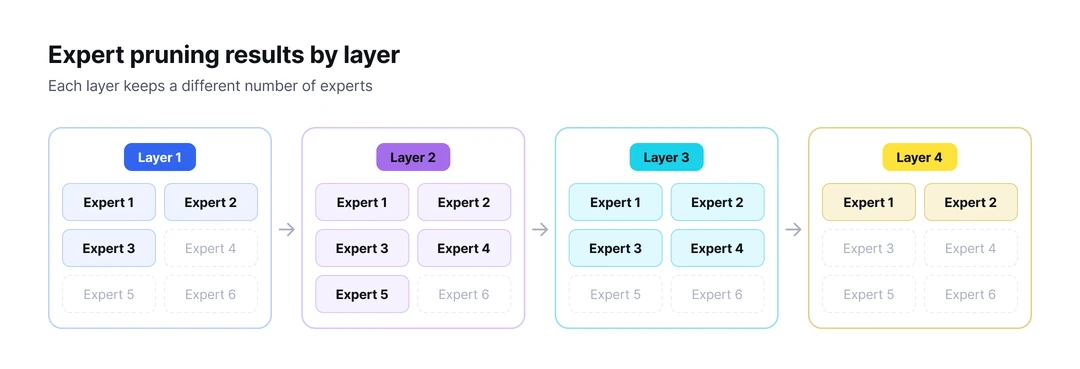
This brought the weights down to 117.8 GB, 76.5% off the original. Even with 20 GB of KV cache added, that is 137.8 GB, inside the 160 GB ceiling of two cards. It now runs on two H100s.
The card count is now down to two. But none of it matters if accuracy collapsed along the way. To check, we measured a different benchmark at each step.
Step 1, quantization, was validated on the average of 15 combined tasks spanning agents, math, code, Korean, and knowledge. Against the BF16 original (81.57), it came to 81.17, a drop of 0.4 points, and 4 of the 15 metrics actually rose.
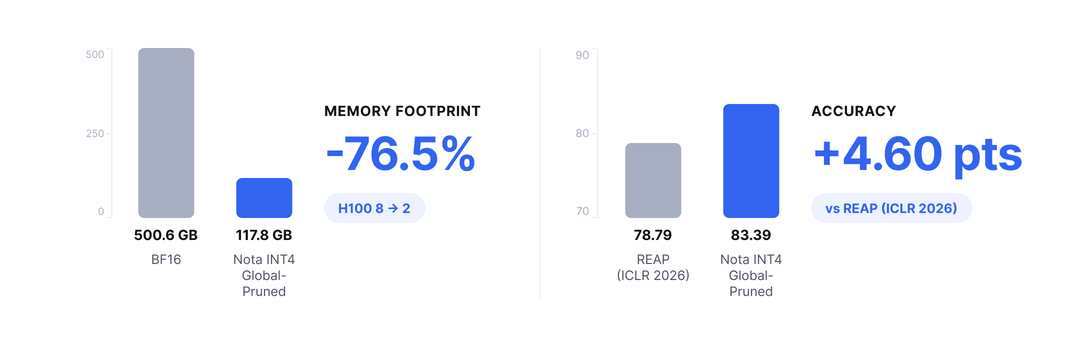
Step 2, pruning, was measured against the average of three high-difficulty reasoning tasks. It went from 83.99 to 83.39, which means shedding another 25 GB of weight cost only 0.6 points of accuracy.
Compared with REAP (ICLR 2026), a uniform pruning method at the same compression rate, which scored 78.79, this is 4.6 points higher.
The second case is Kimi K3, released by Moonshot AI in late July. Its performance is compared with frontier-class commercial models, and its size, at 2.8T parameters, is more than ten times that of Solar Open2. The recommended setup is eight B300s.
There was a separate problem. From the moment it was released, its weights were already quantized to MXFP4 and its activations to MXFP8. That meant there was almost no room left to shrink it further through quantization.
One path was left: reducing the structure itself to remove expert modules, the same non-uniform global pruning as Step 2 in Case 1. Here, though, we used an improved version of the method. While pruning Solar Open2 earlier, we had identified the reasoning tasks that dropped especially sharply, and this time we focused on reducing that loss.
We measured the global scale of the whole block and set a different removal ratio for each layer. The resulting checkpoint for the 50% version kept a different number of experts per layer across its 92 MoE layers, from 350 up to 717, for a total of 41,216.
We released two versions. The one with 25% of the experts removed runs on six B300s, and the one with 50% removed runs on four.
Now it is time to look at accuracy.
The 25% pruned version matches or beats the original on all four benchmarks. That means it uses two fewer GPUs with no drop in performance. Against REAP, which cuts the same proportion at every layer, it is 1.84 points higher on average across the four benchmarks.
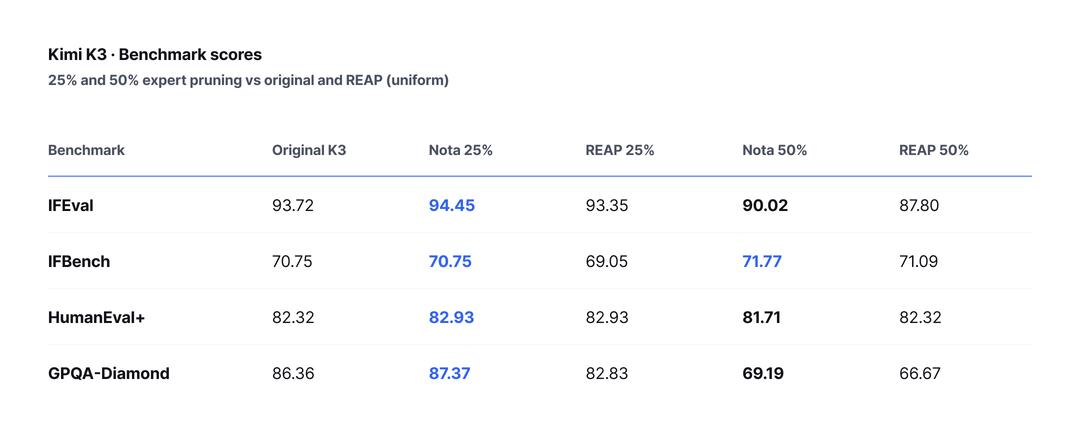
Even with half removed, it held instruction-following (IFEval, IFBench) and code generation (HumanEval+) scores nearly steady. That said, since pruning loss tends to concentrate in specific tasks, GPQA-Diamond, which measures graduate-level scientific reasoning, did show a decline. Even so, compared under the same evaluation setup against a version of the same model pruned with REAP, this metric is 2.52 points higher.
Solar Open2, which needed eight H100s, runs on two; Kimi K3, which recommended eight B300s, runs on four. More recently, we compressed Alibaba's Qwen 3.8 2.4T, which needs 24 B300s in BF16, down to four cards through quantization and 40% pruning. By weighting the calibration data toward the domains that dropped the most, we all but removed the per-task skew in loss that had remained in the Kimi case.
Now let us return to the opening question. What Nota AI has been doing is making models smaller, but in the end it is also a cost problem. For an organization that buys its own GPUs, the number of units sets the size of the initial investment; for one that runs on the cloud, the instance size sets the monthly bill. Cut GPUs to anywhere from half to a sixth, as in these cases, and both of those numbers come down together.
You can find the compressed models on Nota AI's Hugging Face account, and if you need to run your model on fewer GPUs, get in touch.

※ The figures in this article are results for the specified combinations of model, hardware, and settings, and may vary in other environments.